V2.2 NOW LIVE · ON-DEVICE NEURAL ENGINE

Hear it. Understand it. Keep it.

In a crowded room, isolait finds the one voice you came for, follows it, captions it, and remembers it next time — 100% on your phone, no internet required, unless you opt in to one optional feature.

Download on theApp Store Free · Requires iOS 26 or later · Pro free for 7 days
SEE IT WORK

Watch isolait lock in

The same walkthrough that's built into the app — two voices talking at once, then one voice, alone.

DEMO · SIMULATED AUDIO
TARGET VOICE

"Hey are we still on for coffee tomorrow morning? I was hoping nine, maybe ten o'clock would work for you."

OTHER VOICE

"So, then he told me the meeting got moved to Thursday. Now I have to rearrange my entire afternoon."

🗣️

Two voices, talking at once

Watch what happens to each line above

This loops automatically — the real app times it to your own voice, not a fixed clock.

THE REAL APP

Not a mockup — this is isolait

Straight from the app: lock a voice, point and track it by direction, translate live with Voyage, clean up and transcribe audio or video in Studio, know exactly who's talking — and now, with V2.2, record and transcribe from Direction Mode too.

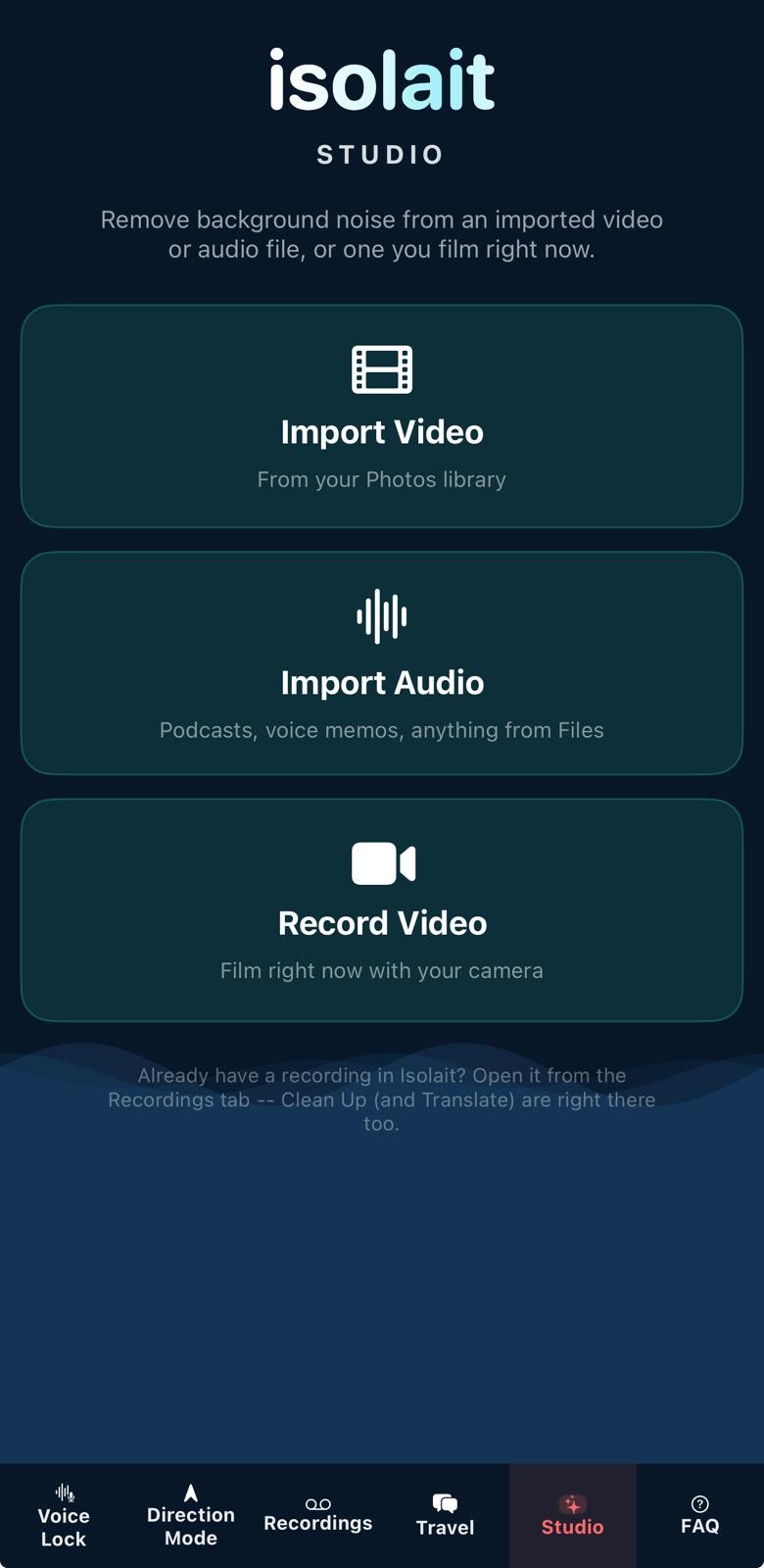
Isolait Studio screen showing three entry points: Import Video, Import Audio, and Record Video
StudioImport, record, clean up
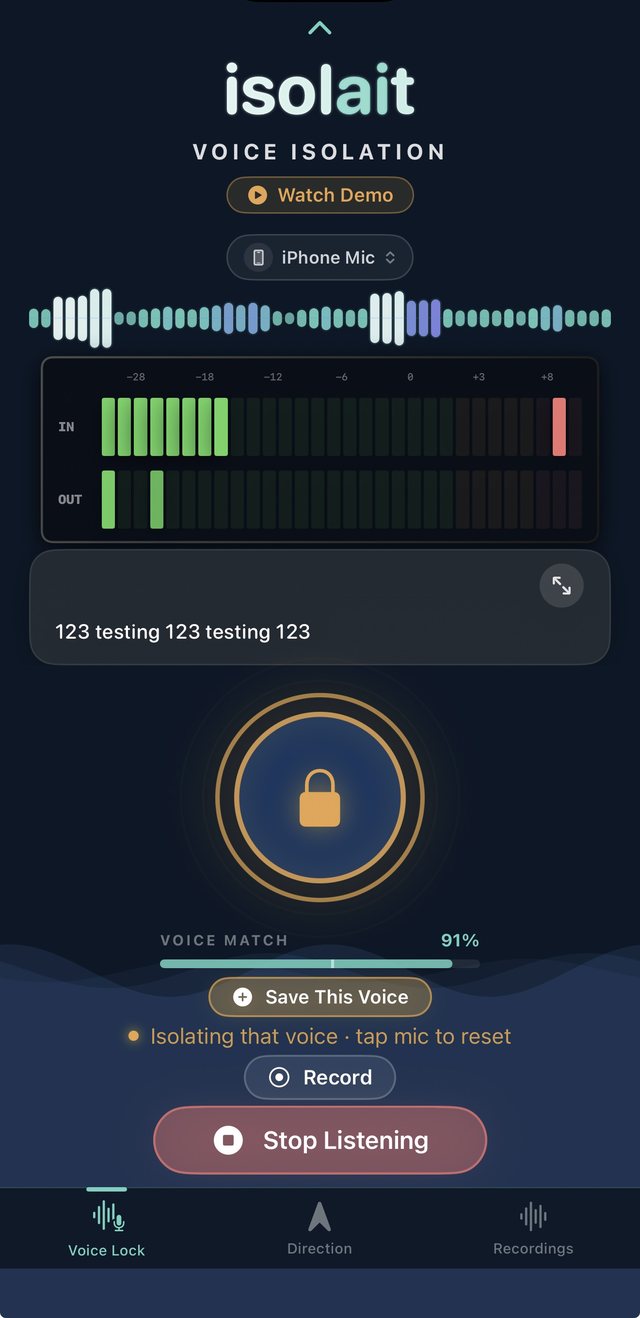
Isolait Voice Lock screen, locked onto a speaker and isolating live
Voice LockLocked in, isolating live
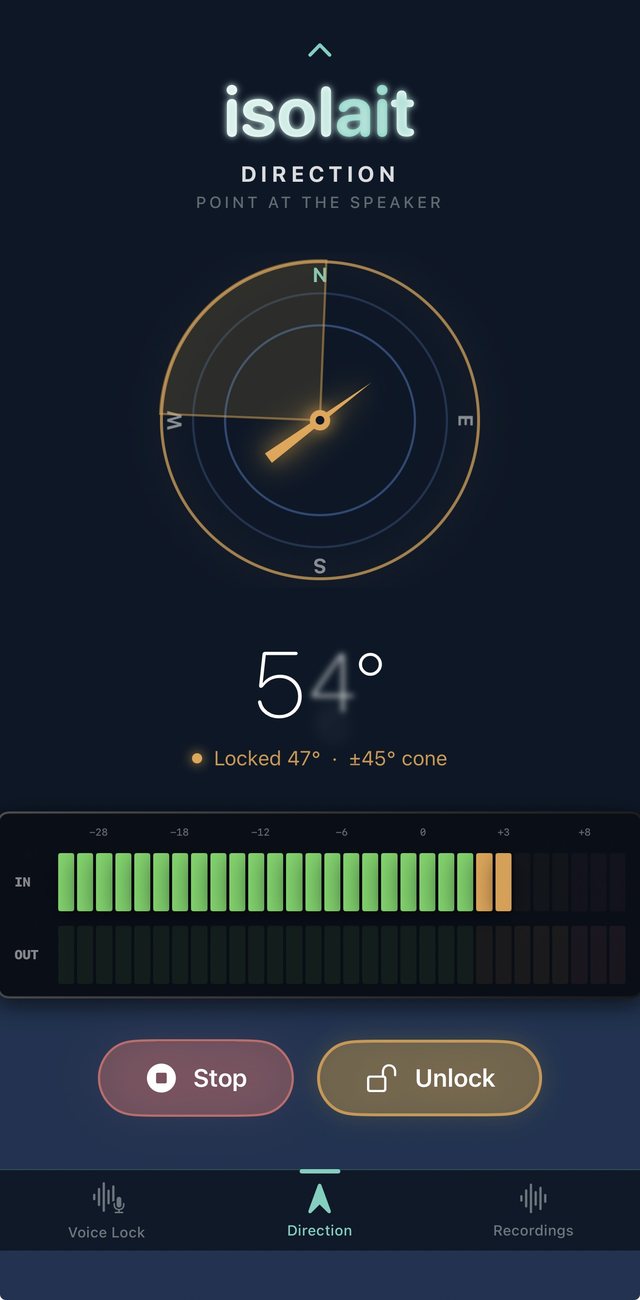
Isolait Direction screen showing a compass locked onto a heading, with a 45 degree cone
Direction LockPoint at the speaker — now records too
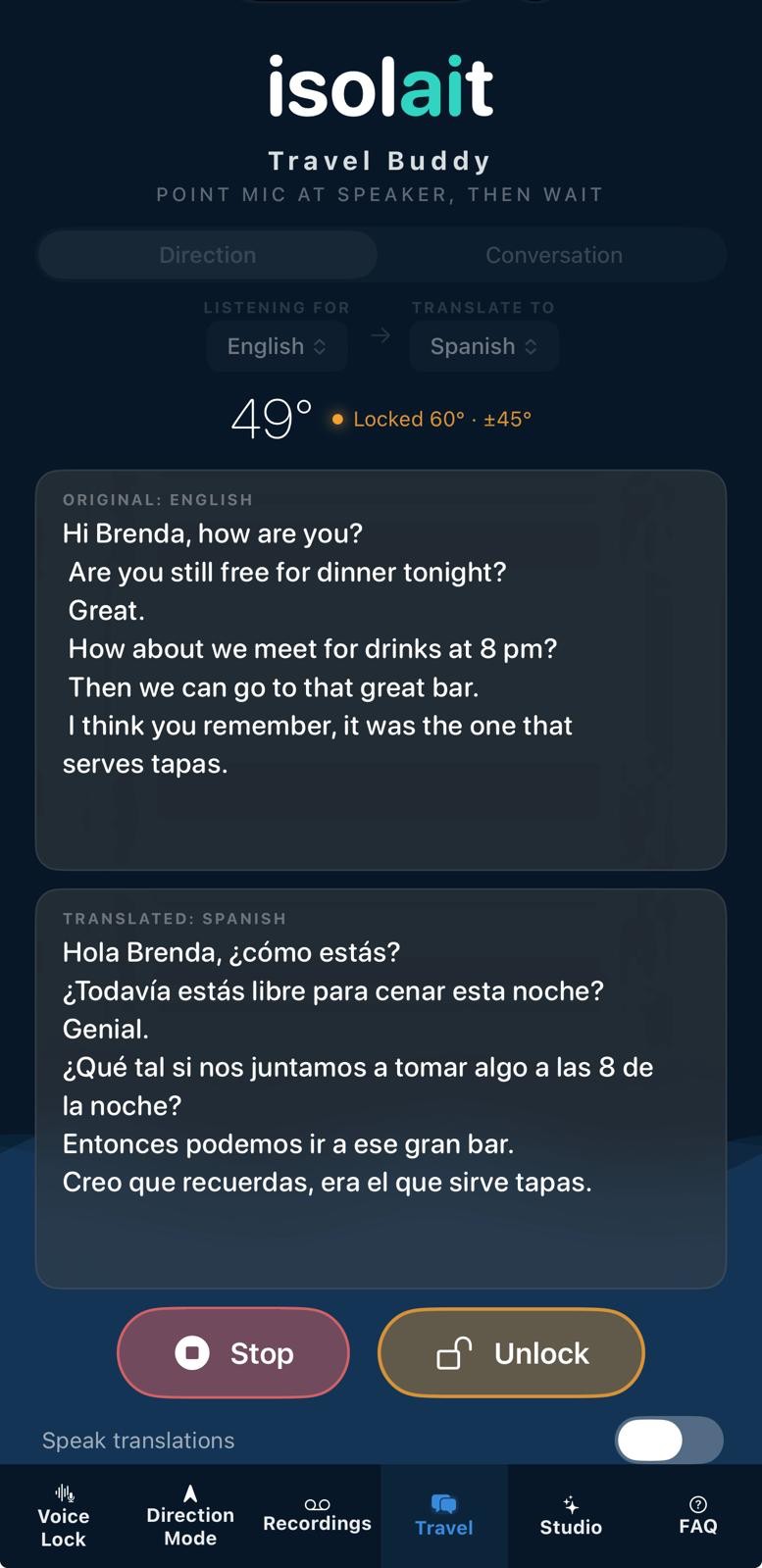
Isolait Voyage screen showing a live English-to-Spanish conversation translation
VoyageLive translation, point and go
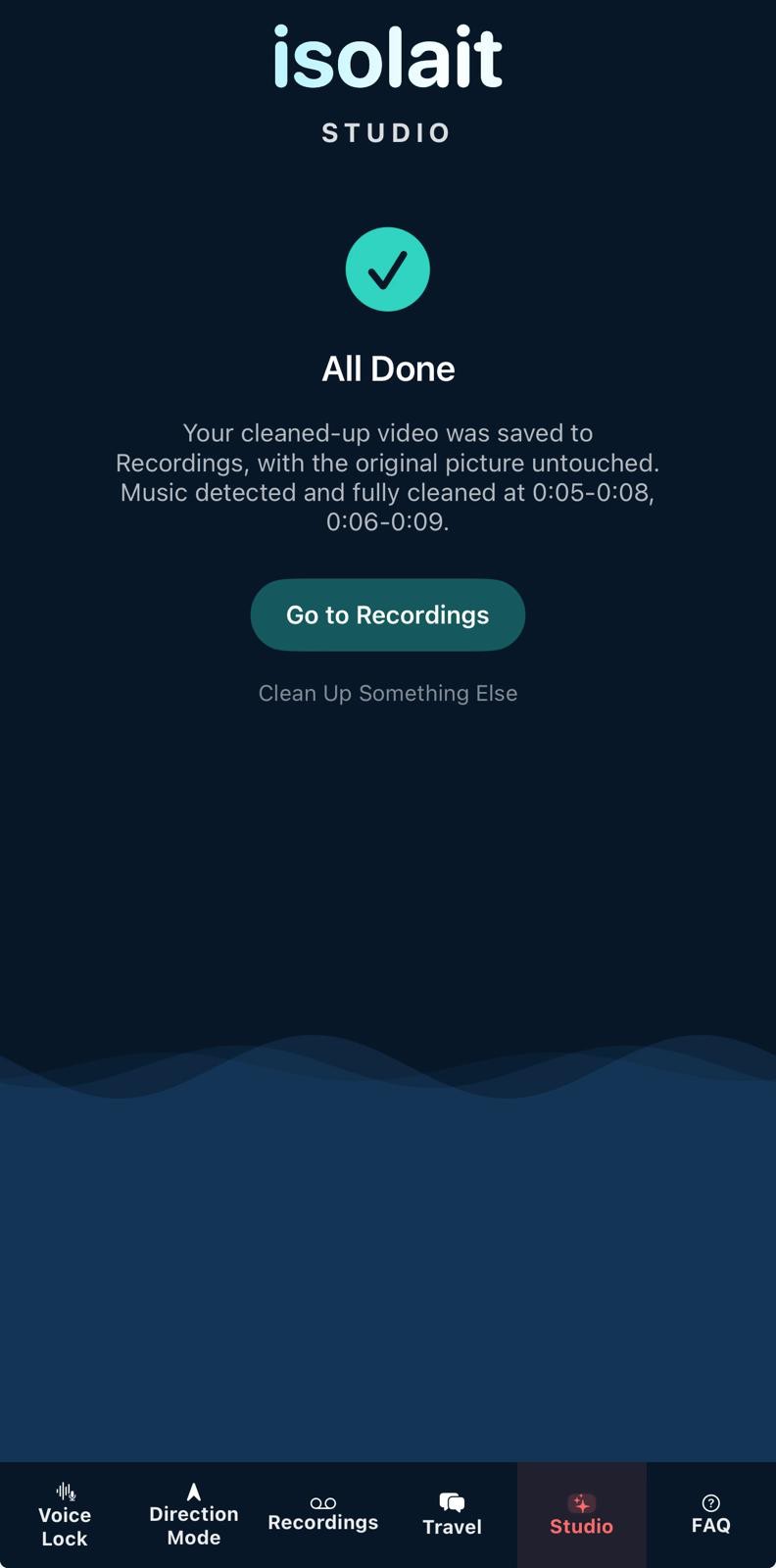
Isolait Studio All Done screen confirming a video was cleaned up with the original picture untouched
StudioNoise gone, nothing else touched
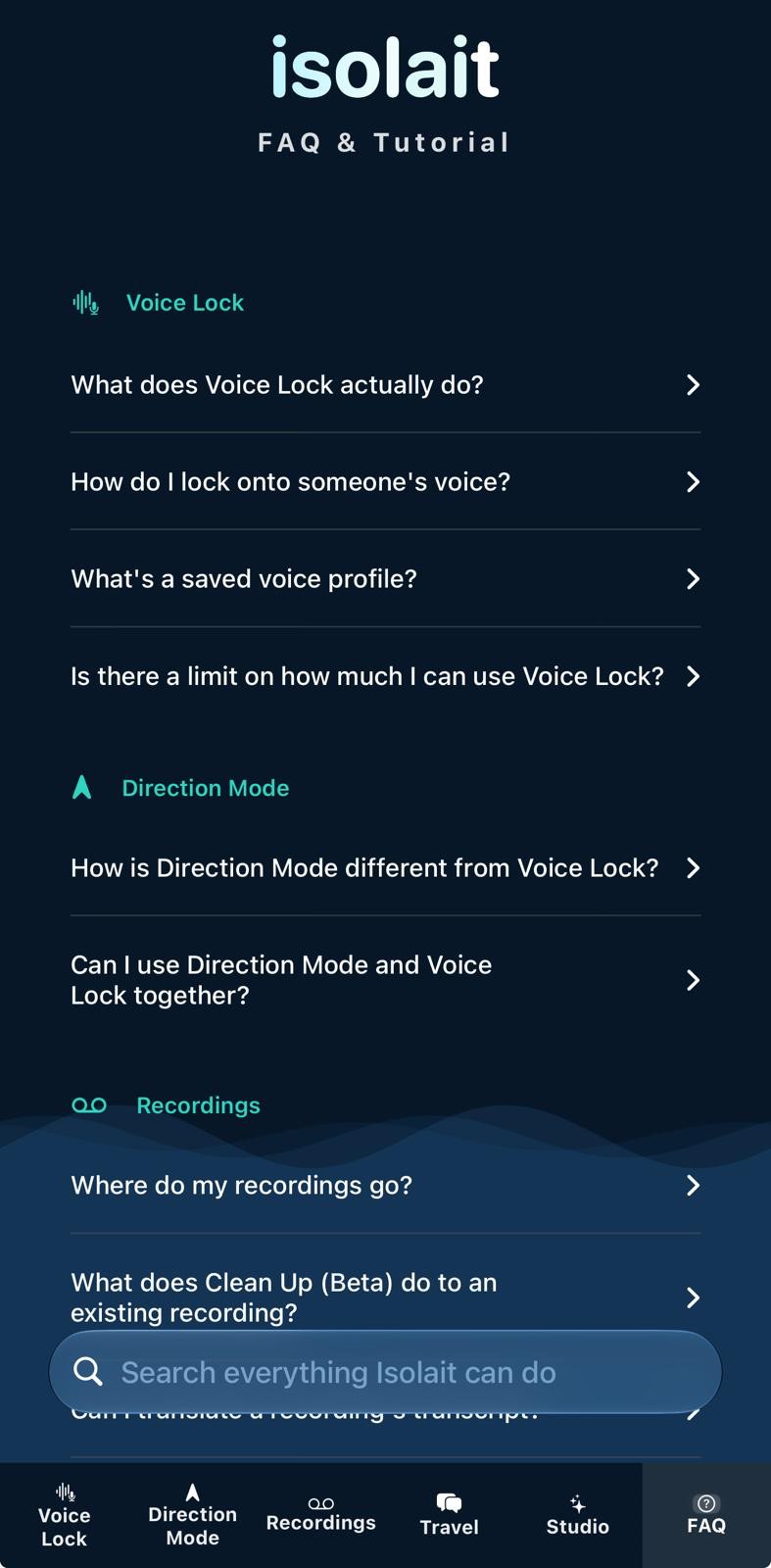
Isolait FAQ and Tutorial screen with searchable questions grouped by feature
FAQ & TutorialEvery feature, explained
CORE ENGINE

One voice. Everything else, quiet.

Every feature runs locally on Apple's Neural Engine, with or without an internet connection — no server in the loop, and nothing leaves your phone unless you opt in to Enhanced Transcription, an off-by-default setting.

Voice Lock

Tap the mic to sample any voice nearby. Isolait captures a unique voice fingerprint in seconds, then locks onto that speaker — filtering out background noise and every other conversation in the room.

Direction Lock (Patent-Pending · Now Records)

Point your phone at the person you want to hear. Isolait combines your device's heading with microphone beamforming and voice fingerprinting to isolate not just a voice, but the direction it's coming from. New in V2.2: record a session and capture a live transcript, just like Voice Lock — and it's now free for 30 minutes a day. Currently supported on your iPhone's built-in mic; AirPods support is coming in a future update.

Voyage — Live Translation

Point your phone at someone speaking another language and hear it translated back, live and entirely on-device — no typing, no server round-trip, nothing leaves your phone. (The first time you use a new language, iOS may download its language pack; after that it works offline.) Save and export the session right on the spot. An experimental two-way Conversation Mode lets you and the other person each speak your own language, both sides translated as you go. Free every day, with a daily time cap.

Studio

Bring your own audio and video into Isolait, not just what you capture live. Import a video from your camera roll, an audio file from Files, or film one right in the app — then run on-device AI Clean Up to strip background noise, with an optional Transcribe toggle for a speaker-labeled transcript you can translate and export too. Longer imports now show real progress through Clean Up, Transcribe, and Identify Speakers, instead of just a spinner.

Identify Speakers

Built for podcasts, interviews, and any recording with more than one voice. Isolait labels who's speaking in a Studio import or a Voice Lock recording — anyone you've saved a Voice Profile for gets their real name, everyone else gets "Speaker 1," "Speaker 2," and so on. Entirely on-device.

Live Spectrum View

Watch your audio environment come alive with a real-time visualizer — see exactly what's coming in, and exactly what isolait is sending back out.

Isolated Transcription (More Accurate in V2.2)

Get a live transcript of your locked speaker only — cross-talk and background noise stay out of your notes, not just out of your ears. Voice Lock and Direction Mode transcription now run on Apple's newest on-device speech model, with noticeably better accuracy on fast or overlapping speech — and nothing sent anywhere to make it happen. Read a long or multi-speaker transcript full-screen, at whatever size is easiest to read.

Enhanced Transcription (Optional)

On fast or overlapping speech, on-device recognition can miss words. This opt-in setting — off by default, and switched on one recording at a time — lets you choose more complete, off-device transcription when you want it. It's the only feature in the app that uses an internet connection. Voice isolation and cleanup always stay on-device, no matter what.

Saved Voices

Lock a voice once and keep it. Isolait remembers the voices that matter so you can drop back into a lock in a tap, no re-sampling required.

Pick Your Input

Switch between your iPhone's mic, AirPods, or any connected Bluetooth headset right in the app — isolait detects what's available and adapts to whichever one you're using.

Lock Screen Control

See who's locked in and control isolait right from your lock screen or AirPods — no need to keep the app open or your phone unlocked.

Siri & Widgets

Say "Hey Siri, start listening" to lock in hands-free, or tap a Home Screen widget to jump straight into a lock — isolait meets you wherever you already are.

Built for Privacy

Isolait is 100% on-device unless you opt in. It runs on Apple's Neural Engine and needs no internet connection — use it anywhere, any time, with no signal at all. No audio is uploaded, stored, or shared; the only exception is Enhanced Transcription, which stays off unless you turn it on for a specific recording, and even then goes only to Apple's Speech Recognition service, never to us. Voice isolation and cleanup never leave your phone, full stop.

FAQ & Tutorial

A full, searchable guide to everything Isolait can do, built right into the app — no more digging through settings to remember how a feature works.
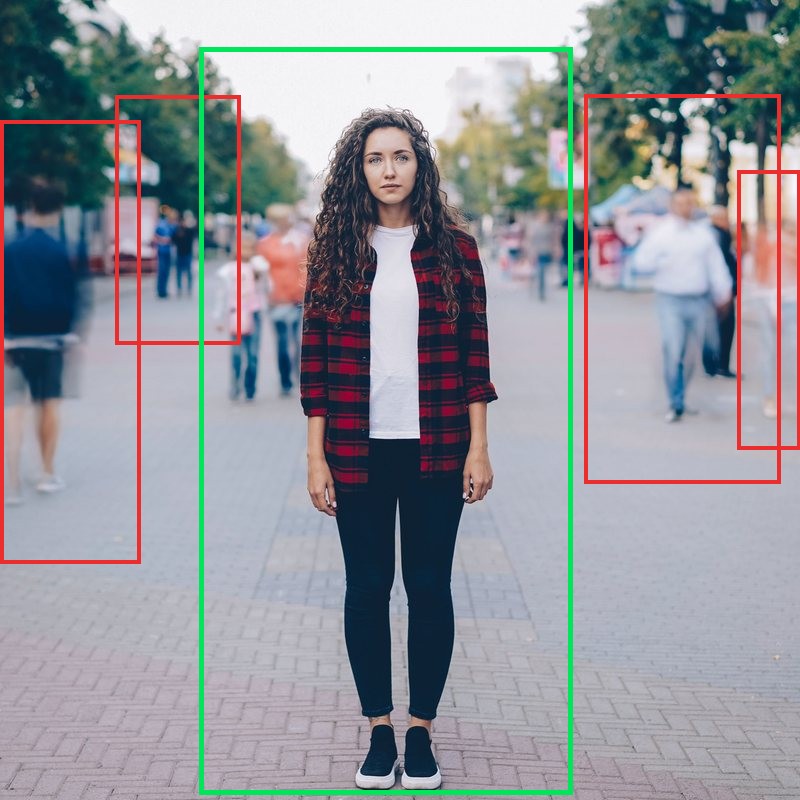
Isolait works best when you're focused on a single nearby speaker. Performance in very loud or highly reverberant environments will vary — Isolait is built to help you hear better, not to replace a hearing aid.

FREE VS PRO

Free gets you started. Pro removes the limits.

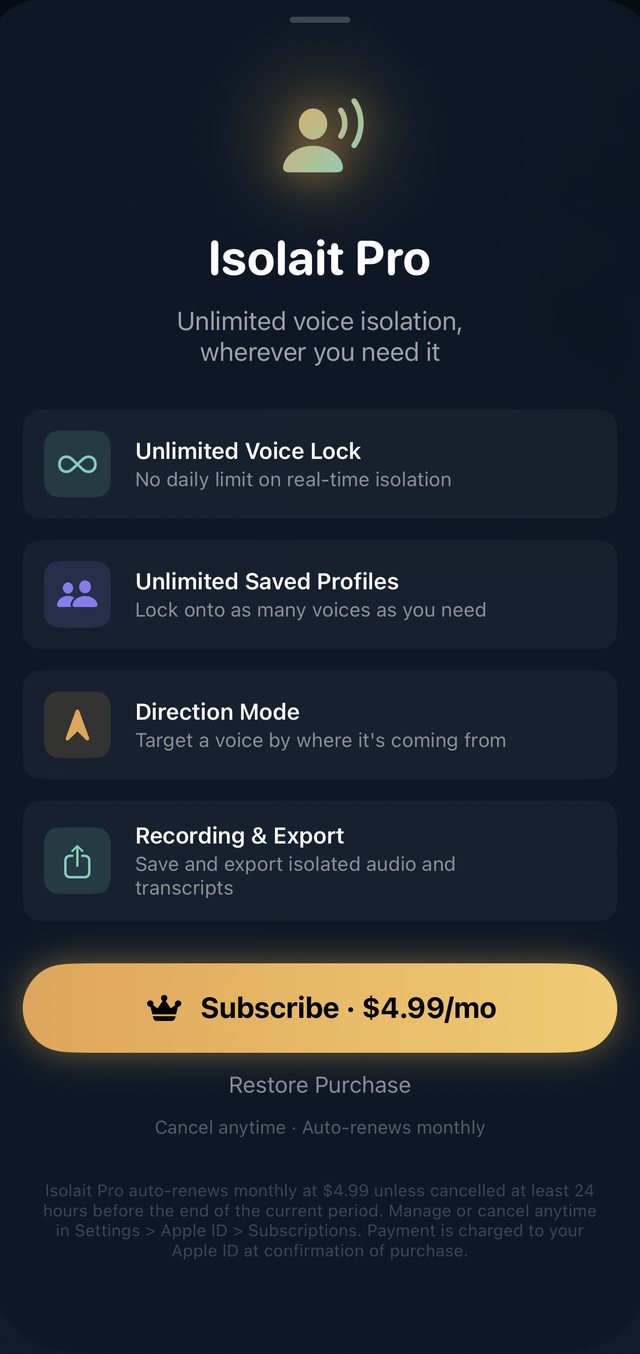
The full engine works on Free — Voice Lock, Direction Mode, and Voyage's live translation, every day, with daily time caps that V2.2 just raised. Isolait Pro removes the caps and unlocks unlimited recording, Studio, AI cleanup, and translation — straight from the same paywall in the app.

The actual Isolait Pro paywall screen in the app, showing the 7-day free trial, $4.99/mo price, and full feature grid including Studio
The actual paywall
Free
$0
  • Real-time Voice Lock, 30 minutes a day
  • Direction Mode, 30 minutes a day — new to Free in V2.2
  • Voyage live translation, 60 minutes a day
  • Studio: one free Clean Up a day, plus one free recording save to try before going Pro
  • A limited number of saved voice profiles
  • Live Spectrum, transcription, Speaker Labels
  • Lock Screen control, Siri & widgets
Isolait Pro
7 days free then $4.99 / month
  • Unlimited Voice Lock — no daily limit on real-time isolation
  • Unlimited Saved Profiles — lock onto as many voices as you need
  • Unlimited Direction Mode — no daily cap on targeting a voice by where it's coming from
  • Unlimited Recording & Export — save and export isolated audio and transcripts from Voice Lock, Direction Mode, and Voyage
  • Unlimited Voyage — no daily cap on live translation
  • Unlimited Clean Up & Translate — strip background noise and translate transcripts into 20+ languages, on-device
  • Full Studio — import or record video and audio, then AI Clean Up and Transcribe it, on-device, without the daily limit

Try Isolait Pro free for 7 days — cancel anytime during your trial and you won't be charged. After the trial, Isolait Pro auto-renews monthly at $4.99 unless cancelled at least 24 hours before the end of the current period. Manage or cancel anytime in Settings > Apple ID > Subscriptions. Payment is charged to your Apple ID at confirmation of purchase.

PRIVACY BY ARCHITECTURE

Nothing to leak, because nothing leaves

Most "AI" voice tools mean a round trip to a server. Isolait is 100% on-device unless you opt in: every feature runs on your iPhone, works with no internet connection at all, and your audio is processed and discarded locally, every time. The only thing that ever uses a connection is Enhanced Transcription — an optional setting that's off by default, that you switch on one recording at a time, and that sends audio only to Apple's own Speech Recognition service, never to Isolait. (Voyage may download a language pack from Apple the first time you use a new language — a one-time download, and none of your audio goes with it.)

0
audio files received by Isolait, ever — we run no servers and never see your recordings
100%
on-device, internet-free — airplane mode, a basement, a flight: everything works. Only Enhanced Transcription (opt-in) and a first-time Voyage language pack need a connection
67.5 MB
total app size — no bloated cloud ML runtime to download, and no internet needed to use it
SHIPPED · V2.2

What's live right now

V2.2 is out — faster, more accurate transcription, Direction Mode that records, and more to do for free every day. Start Isolait Pro free for 7 days, and Voice Lock, Direction Mode, and Voyage's live, on-device translation are all free for everyone, every day.

Faster, more accurate transcription

Voice Lock and Direction Mode transcription now run on Apple's newest on-device speech model — noticeably better accuracy, especially on fast or overlapping speech. Requires iOS 26 or later.

Direction Mode now records

Lock a direction, tap Record, and capture a session with a live transcript — matching what Voice Lock could already do. Recordings land in the same place, with the same transcript, clean up, translate, and export options.

More free, every day

Voyage free time doubled to 60 minutes a day, Voice Lock to 30 minutes a day, and Direction Mode now includes a free 30 minutes a day (previously Pro-only). Studio includes one free Clean Up per day, plus one free recording save to try before going Pro.

Identify Speakers — know who's talking

Studio imports and Voice Lock recordings can now label who's speaking. Anyone you've saved a Voice Profile for gets their real name; everyone else gets "Speaker 1," "Speaker 2," and so on. Built for podcasts, interviews, and any recording with more than one voice.

Full-screen transcript view

Read a long or multi-speaker transcript at a larger, adjustable size, right from the transcript header.

Studio shows real progress

A percentage through Clean Up, Transcribe, and Identify Speakers — instead of just a spinner — so a longer import never looks stuck.

Enhanced Transcription — optional, off by default

On fast or overlapping speech, on-device recognition can miss words. This setting lets you choose more complete, off-device recognition for a specific recording, one at a time. Voice isolation and cleanup always stay on-device.

More reliable video imports and transcripts

Video importing in Studio is more reliable, and transcripts are more complete on recordings with multiple speakers or natural back-and-forth conversation.

Studio — clean up video, not just audio

Import a video from your camera roll, an audio file from Files, or film one right in the app, then strip background noise with on-device AI. Turn on Transcribe for a speaker-labeled transcript you can translate and export too.

FAQ & Tutorial — every feature, explained

A full, searchable guide to everything Isolait can do, right in the app — a real tab now, not a buried settings page.

A cleaner look, across every tab

Refreshed navigation and simpler wording throughout Direction Mode and Voyage — the app should feel as clear as it sounds.

A round of reliability fixes

Video imports in Studio no longer stall on longer or higher-resolution clips, new recordings sort newest-first every time, and Clean Up previews load reliably.

Try Isolait Pro, free for 7 days

Start your trial right from the paywall — no charge until it ends, cancel anytime in Settings.

Voyage — point, listen, understand

Hold your phone up to anyone speaking another language and hear it translated back live, entirely on-device. An experimental two-way Conversation Mode covers back-and-forth exchanges, each person hearing their own language.

A clearer look at what Pro unlocks

The paywall now shows every Pro benefit at a glance — including AI Clean Up, transcript translation, and unlimited Voyage — instead of requiring a scroll to find them.

Share your isolated audio and transcript

Export a recording's audio and its formatted transcript together, straight from the app — one tap, no extra steps.

Read any transcript in your language

Translate a locked-in transcript into roughly 20 languages, entirely on-device — nothing sent anywhere to get translated.

Clean Up — noise gone, every voice kept

Already have a noisy recording? Strip out room tone, traffic, and hum after the fact, processed entirely on your iPhone.

Isolait Pro subscription, now live

Unlimited Voice Lock, unlimited Direction Mode, unlimited saved profiles, and recording & export — $4.99/month, auto-renewing.

Real voice isolation, frame by frame

A live audio pipeline separates voice-range signal from ambient noise as it happens — no lag, no buffering.

A voice it remembers, even as the room changes

Once locked, isolait holds onto that speaker's fingerprint through movement, crosstalk, and changing background noise.

Locks back on faster after crosstalk

When someone else cuts in, isolait's recovery is noticeably quicker now — roughly half the time to fully re-lock onto your target voice.

More reliable isolated transcription

Every word from your locked-in voice appears as text in real time — transcribed on your phone by default, never sent anywhere else unless you opt in.

Speaker-labeled transcripts

Transcripts note who's speaking, so multi-voice recordings are easier to follow — and since Identify Speakers, saved voices get their real names.

Choose whichever mic you're actually using

Pick between your iPhone's built-in mic, AirPods, or any connected Bluetooth headset — isolait detects what's plugged in and lets you switch on the fly.

Save the voices that matter

Build a personal library of voices you've locked before, and drop back into them instantly — no re-sampling required.

Control it without touching your phone

Lock screen and AirPods controls let you see who's locked in and pause or resume without unlocking your phone. Say "Hey Siri, start listening" for a hands-free lock, or tap the Home Screen widget to jump straight in.

Confidence meter, now visible while reading captions

The live lock-strength meter shows up in caption/reader view too, instead of being hidden behind the transcript.

Direction Lock, narrowed for accuracy

Your phone's heading helps bias toward whoever you're physically facing — useful the moment you walk into a noisy room. For now, Direction Lock is limited to your iPhone's built-in mic; AirPods support is coming in a future update.

IN THE LAB

What's next

The core engine is just the beginning. We're building toward something bigger — and every chapter ships when it's ready, not before.

In progress

First Run, Done Right

A guided first launch and per-device tuning, so isolait locks in perfectly whether you're on your phone's mic or your headphones.

// 01
Coming

The Room

Isolait starts understanding more than just one voice at a time — tracking and separating multiple speakers as a conversation moves around you.

// 02
Coming

Podcast Mode

Record a room instead of just one voice, then pull any single speaker back out of it afterward, cleanly.

// 03
On the horizon

Beyond the Phone

The same engine, built to go wherever your voice needs to follow.

// 04

Want in early? Every App Store update is the fastest way to find out first.

Coming soon · New from the Isolait family

Introducing Isolait — Sensory Comfort

A new app built on the same on-device engine, for anyone the world sounds too loud for. Rather than blocking noise out entirely, it dials it down — keeping a trusted voice clear while everything else fades into the background, gently and gradually.

Directional dampening

Quiet the noise from one direction while leaving the rest of the room untouched.

Trusted-voice priority

Keep a parent's, teacher's, or caregiver's voice clear above the surrounding noise.

One-tap calm mode

A simple, caregiver-friendly control for the moment a room gets overwhelming.

Isolait — Sensory Comfort is a sound comfort and sensory support aid, built for everyday sound sensitivity. It's not a medical device and isn't intended to diagnose, treat, or cure any condition. On-device only, account-free by default. Still in development — no release date yet.

Stop straining to hear.
Start isolating.

Free to download. Works the moment you open it — no account, no setup, no internet required, and your audio stays on your phone.

Download on theApp Store